 If you are a mac user with any need for an FTP application, you have no doubt heard of Panic's Transmit. Transmit has won several awards and most recently an Apple Design Award for using Tiger technology the most. Things like dashboard integration with a simple drag and drop widget, local smart folders, bookmark syncing, automated workflows and more. In addition to various bug fixes version 3.5 ushers in things universal binary support so you can run it on your latest Intel-powered Mac and indulge in the inclusion of some great new features.
UI
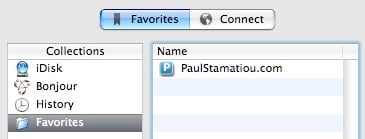
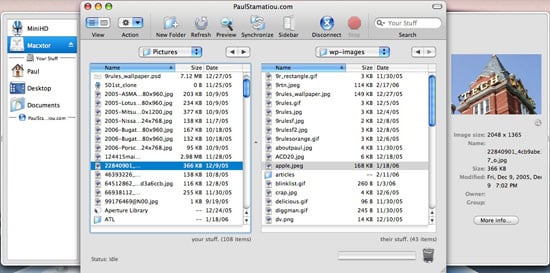
Transmit excels when it comes to the application's user interface. Everything is where you would expect it to be. If you've ever used another FTP application such as Cyberduck or Fugu, you won't have any problem adapting to Transmit. The first thing will notice is a drawer on the left and another on the right. The one on the left, called sidebar, adds Finder functionality allowing you to easily find any file you might want to put on your server. Meanwhile, the drawer on the right, dubbed Preview, gives you the information for any currently selected file or folder; local or remote. The information is also accompanied with a nifty preview box, which even displays images. This drawer eliminates the need for a right-click to find out simple file info. Oh and did I mention it supports Column view! I'm a big fan of tabs as well - no need to open a second instance of Transmit to access your other server, as you have to do with many other FTP clients. Transmit also grabs the favicons from each server you connect to; that's some amazing attention to detail.

One of the cooler things I discovered by playing around is that when you click on the little magnifying glass to the bottom right of the preview drawer, it will open up any file in its default editor or if it is an image, display a larger version with a nice zooming animated action. Panic thought this one through - I attempted to trick Transmit and display a 5 megapixel image but it automatically scaled it so that it did not take over my entire workspace. Also, everything was designed with the layman in mind as visible by naming local files "your files" and remote files "their files."
Feature Overload
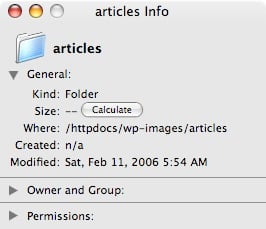
Transmit comes loaded out of the box with an insane amount of helpful features... it's that good kind of insane though. One of my favorites that version 3.5 brings to the table is the ability to calculate the file size for folders. This makes it easy to distinguish the heavy hitters from the lightweights when it comes to folders. Simply right-click » Get Info on any folder, then click Calculate under General.
Another great feature of 3.5 is a little wonder called droplets. Create a droplet for your most used folder, place it somewhere convenient and drag files/folders on top of it to easily put them on your server. Right-click the folder of your choosing and select Save Droplet for Folder to use this feature.
Now I would like to dwell a bit on the two new features that rank high in my books: Edit in Whatever and Synchronization. Similar to how you can right-click any file in OS X and open with the application of your choice, "Edit in Whatever" lets you edit any file, local or remote, in literally whatever application you wish. The cool part about this is that it's compatible with images. Take what Cabel from Panic told me for example:
For example, you can right click a ".gif", choose "Edit in Photoshop", and Transmit will download the file and open it in Photoshop. Once you hit "Save" in Photoshop, Transmit will automatically upload the file back to the server!
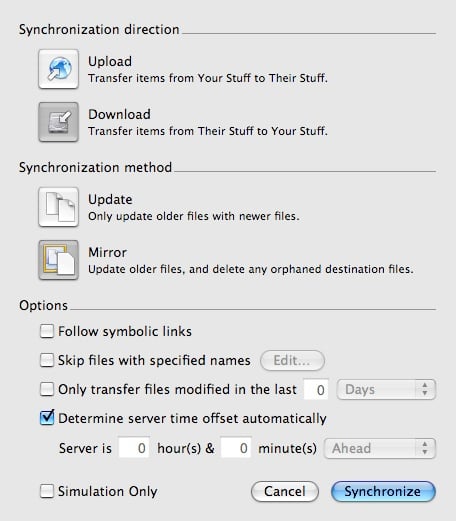
This is a fantastic feature that I'll be using for a long time. I'm always opening things in SubEthaEdit and editing them on the fly and now with the added perk of doing this with Photoshop there's no reason to look back. The latter feature, synchronization, gives you a plethora of options and settings for maintaining two identical folders on your local machine and server. I've already used this for keeping a sync'd copy of my K2 theme folder on my desktop, which I'm always editing. With synchronization, I can locally edit my K2 folder for a redesign, for example, without any internet as the campus connection is prone to such misfortune and when I regain a connection, sync the folders. No worrying about which files I need to overwrite or forgetting to delete an unused file - Transmit's got my back. For those skeptical about synchronization, there is a simulation mode that lets you see what files would be modified, just so you can see what files would be changed and alter the settings to get your desired effect.
Some of other noteworthy features of Transmit include directory searching, something I personally use for many of my larger remote folders, the ability to integrate with the Growl notifier, the ability to import and export server favorites, DockSend (think droplets in your dock), an extremely nifty accompanying widget, support for tons of connections (FTP, SFTP, SSL, TLS) and a lot more. One small feature that I love is the ability to hide/show invisible files, an indispensible feature that I always use when I don't want to accidentally muck around with my .htaccess file. Take a look at that in the View menu.
So You Use iWeb Do Ya?
Apple's iLife '06 features a new application called iWeb that easily lets you create websites and blogs ready for publishing within a few minutes. Fortunately for those blessed to have a copy of both iWeb, Transmit 3.5 is the ultimate complement. Take a look at how easy it is to publish that new iWeb-created site with Transmit.
Wrapping It Up
If you want to see a little preview of Transmit in action, be sure to take a look at the v3.5.1 demo and then check out Cabel, Co-Founder Panic Inc., talking with Amber Mac at the MacWorld Expo on the new vidcast, MacBreak. Don't forget to check out Cabel's awesome personal site as well. If you're pleased with the quality of Transmit, you won't be disappointed with any other their other apps such as Unison, the Usenet killer app, as well as some of their other developments. Thanks to Cabel for hooking me up with a license! You can probably tell I love Transmit; I recommend you check it out for yourself and then buy a copy. Also, I don't think I mentioned it anywhere else, but Transmit is lightning quick! It boots up and can connect to my server within 5 seconds... Cyberduck took at least 10 with skEdit a bit longer.