Twitter: in profession communication class.. talking about typography today, ohh
Subscribe via RSS or email  #error


Part 3: Azureus Anonymity

Oct 14, 2005 in , ,

Note: Please consider setting up a Tor server to donate bandwidth to the network.

There has recently been a lot of buzz about decentralized trackers for BitTorrent and other tools resulting in anonymous filesharing. My goal for this article is to have your Azureus installation running on the Tor anonymizing overlay network for TCP. I will essentially be translating this article into something that you can follow. This article is part of a series, please check out the first and second articles if you have not done so already. Warning: This one’s a bit more difficult.

So what exactly is Tor?

Tor is the tool we are going to use to provide a layer of anonymity to Azureus. There is another approach to anonymous Azureus using the I2P network and you may attempt that by yourself. With Tor, your data takes a random route using Onion routers, a distributed network of servers, rather than a direct source to destination path. You can think of Tor as a large network of proxies. Your data randomly hops from proxy to proxy until it reaches its destination. That being said, anonymity is not the fastest thing so don’t expect to be getting 600kb/s down. This makes it impossible for anyone to find out any more information about your packets than where they are traveling to at a specific point and since Tor makes sure your data travels in random paths, you are safe. The Tor network is still in its infancy so it is important to understand that we will not be routing peer-to-peer traffic through it, merely client and tracker configuration data. Also, if you’re feeling adventurous you can setup Tor for many online-enabled programs.

Now what?

Point your browser over to the Tor download page and get the latest version of Tor for your OS. Keep your browser on that page and click the Tor installation instructions for either Windows or Mac OS X. Those pages may look intimidating, but we will be skipping the part that says “Configure your applications to use Tor.” If you are following this for Windows, make sure to download and install Privoxy. All you need to do at this point is install the essential Tor package, no need to configure Privoxy just yet.

Choosing a Configuration

Azureus and Tor can be configured to allow for several different types of Azureus usage. You can choose from an anonymous tracker server, anonymous client, anonymous tracker client, anonymous outbound/inbound peer traffic with a public tracker, or anonymous peer data with an anonymous tracker. Since I am pretty sure that most people reading this article are just regular Azureus users and don’t host a tracker server I’m going to go forth with the anonymous client.

Down and Dirty

Open up Explorer/Finder and find your way to C:/Program Files/Privoxy or /Library/Privoxy respectively. Open config.txt in Notepad/TextEdit or your favorite text editor. To this we will add these this line to the very top, before the comments:

forward-socks4a / localhost:9050 .

Then, use the search function and find these two lines:

logfile privoxy.log
jarfile jar.log

In front of each line, place a # to comment them out. Do not forget to save this file.

The next config file we are going to edit is the one used by Tor, torrc. You can find it in C:\Documents and Settings\[USER NAME]\Application Data\Tor or by navigating to Start>Programs>Tor>torrc. Once you’ve located this file, open it up in a text editor and add the following two lines to the top like we just did:

HiddenServiceDir C:\Program Files\Tor\bttracker
HiddenServicePort 6969 127.0.0.1:10069

Note: If you are running Mac OS X you will have to change C:\Program Files\Tor\bttracker to /Library/Tor/bttracker and create the directory bttracker in /Library/Tor/. Make sure to save this file.

Now go to C:\Program Files\Tor\ and create a directory called bttracker.

Almost There

Exit both Tor and Privoxy if they are open, and restart them. This will allow the changes we made in their config files to take effect. If you navigate to C:\Program Files\Tor\bttracker or /Library/Tor/bttracker, there should be two shiny new files just created, hostname and private_key. Right click on hostname and open it in a text editor. There should be one line of text, copy it. For reference, mine was u6sybfzer6icp5mt.onion. This is your tracker’s address. Fire up Azureus and paste this into the first field in Options>Tracker>Server that should be labeled “Tracker external IP address.” While still on this options page, scroll down until you find a checkbox marked “Enable compact announce protocol,” uncheck it. Go to Options>Connection and check the boxes labeled “Enable proxying of tracker communications” and “I have a SOCKS Proxy.” For “Host” enter localhost and for “Port” enter 9050. Click “Save.” You may now close the Options. Restart Azureus for the changes to take effect.

If you want to be able to see the tracker in your browser, click the make a torrent icon in Azureus and click the “Use an external tracker” radio button. The field below it should have your the address you’re looking for. You won’t be able to access *.onion addresses unless your browser has the proxy properly setup. Consult the Tor installation page again for setting up your browser. However, all you really need to know is to use 127.0.0.1 and port 8118 for every service. You can test your proxy by accessing this wiki page http://6sxoyfb3h2nvok2d.onion/tor/.

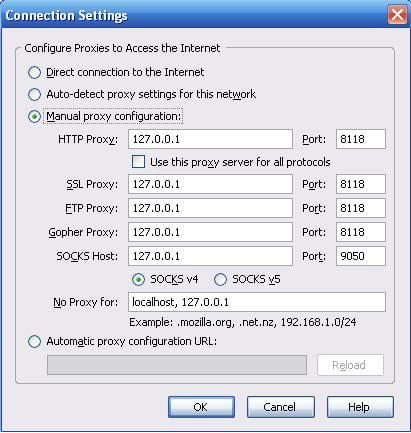

It is also a good idea to visit showmyip.com to make sure that it displays a different IP address than your real IP. That is a sign that Tor and Privoxy are doing their jobs. I highly recommend you browse around the Internet while on Tor to get a feel for the kind of speed Tor currently has. It is far from speedy. I am not promoting the use of bittorrent on the Tor network, merely showing you how to do it strictly for informational purposes. The last thing I want is to get flamed for abusing the Tor network.

As Steve Jobs says, “One More Thing…”

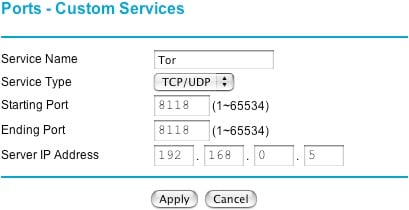
If you are running from behind a router, you will have to take the necessary actions to open up the ports used by Azureus, Tor, and Privoxy. Check article two if you are not sure how to forward ports in your router. You should be set if you open up 8118, 9050 and 6969, assuming default ports are used. I highly recommend setting up Tor and Privoxy not behind a router first to make sure that is setup correctly, and then putting it back behind the router and seeing which ports need to be open. Just a trial and error kind of thing.
That’s It! I only recently found out about the Tor network and researched it until I was able to come up with this article. I hope this article was helpful, at least to some people.

Resources

Check out these websites if you want to find out more about using Tor.

  • Newsgroup
  • Azureus Wiki
  • GotRoot.com Article
  • Any Suggestions?

    Have any ideas or things you’d like to see in one of my articles? I’m always looking for things to write to help out other people. Just shoot me an email via my contact form or reply here and I’ll see what I can do.

    Promote this article on various sites or email to your friends:     


    62 Comments

    1. Good one. I’ve already Dugg it, and will link to it from HiFi Blog later today.

      Question: “That being said, anonymity is not the fastest thing so don’t expect to be getting 600kb/s down.”

      Does this mean it only affects those with super-duper download speeds, or it’ll decrease my 30kb/s downloads too? (In other words, is there just a cap, or an inherent slowness introduced?)

      PS: Comment previewing would be nice.

    2. It’s going to be slow for just about everything. Just browsing around on the Tor network was slow. On a sample torrent, I was getting 25kB/s.

    3. PLEASE !!! Do _NOT_ do this…

      Using Tor like this is an abuse of the network. It slows the rest of us to a crawl…

      unless of course you are willing to run a server and are donating additional bandwith to the system, in which case I’ll apologize in advance…

    4. “I am not promoting the use of bittorrent on the Tor network, merely showing you how to do it strictly for informational purposes. The last thing I want is to get flamed for abusing the Tor network.”

      I’m just showing you how to do it. I don’t personally run Azureus through Tor. I am waiting for the Tor network to mature a bit.

    5. Good article, thanks!

      The main reason for this post is just to say, DO NOT download junk via Onion Routing. You must realize that your exit node will be used to transfer the data, along with the hops between here and there. Bandwidth is very precious to many system admins and 1gb plus downloads are just going to harm rather then help privacy.

      My public Tor resources; http://czarism.com/tor-resources

    6. Tor is dying, each time i try to use it’s more and more slow, people really should understand that p2p is not a priority thing, please get other programs to transfer files, or use ip blockers, try everything, except using TOR.

    7. You make one big mistake. This is not anonymous at all. It’s not even using the tor server. (open the tor cmd screen and Privoxy logs and see) Here is the problem:
      Privoxy is not a socks proxy, tor is. If you use privoxy, you need to take the check out of “I have a SOCKS Proxy”. If you are connecting directly to tor then you change the port to 9050 instead of 8118 and put the check in “I have a SOCKS Proxy”. One more thing, only the connection to the tracker is anonymous. That’s totaly useless if you are concerned about RIAA/MPAA. They don’t run the trackers they connect to the tracker as a regular leecher and get the IP’s of all the peers.
      To be tottaly anonymous you can’t have an open listening port (ie: 6881),Distributed DB or DHT needs to be disabled and you need to enable proxying of peer communication using tor dirctly (port 9050).

    8. Instead of abusing tor. Please use azureus’s i2p plugin instead or another i2p bittorrent client. Join the i2p network and start anonymously filesharing with other i2p users. Unlike abusing tor, i2p based filesharing will scale and i2p can handle it.

      While bittorrent over i2p is best used for sharing new large content with others, i2phex (gnutella over i2p) is best for sharing lots of small and or older files.

      Another option for anonymous filesharing is entropy (the fast freenet replacement that actually works!).

      Also filesharing of i2p is much safer than abusing tor!!

    9. peter ragousis: Thanks for informing me! I will make the changes to this article as soon as I can.

    10. Paul,

      Well done, once again. My business caters to those without a great deal of technical know-how, and your ongoing series on Azureus is a real inspiration to me. You’ve provided clear, concise information on what is, for many people, a subject shrouded in mystery and misinformation. I’ll be placing a permanent link to your site on mine. Keep up the great work!

      Sincerely,

      John

    11. Thanks John! You can expect these kinds of articles as long as I don’t have midterms/finals :-).

    12. @peter ragousis: “Privoxy is not a socks proxy, tor is.”

      But isn’t that what the “forward-socks4a / localhost:9050 .” entry in Privoxy’s config.txt was for, to forward the request to Tor? It should work fine the way he described it. Even Azureus’ guide tells you to do this. The rest of your info sounds solid, though.

    13. Hi,

      I”m using a Mac, OS X. I’m following the steps all the way until almost the end. The two files, hostname and private_key, however, are not found under Library/Tor/btrracker. Could there be anything missed out anyway? How should I fix this?

      thanks,
      Ashley

    14. Ashley: I remember reading about an alternate path in which those files might be located in an OS X system. I’ll try to find that. Did you use

      HiddenServiceDir /Library/Tor/bttracker
      HiddenServicePort 6969 127.0.0.1:10069

      in your torrc, and restart Tor?

    15. Hi Paul,

      Yes I did…And I’ve just tried to configured the applications by following the instructions on the Tor website (http://tor.eff.org/cvs/tor/doc/tor-doc-osx.html). And it turned out that I even couldn’t surf the web at all–couldn’t go anywhere on the internet! So, I only got to change all my ethernet proxy settings back to the default! Have no idea what goes wrong!

      Thank you!

    16. So I am a little confused. If what peter ragousis is saying is correct, what is the point of using privoxy?

    17. PLEASE PLEASE PLEASE folks, Tor is *NOT* designed to this kind of use. Tor is *NOT* scalable, which means that this kind of activity DRASTICALLY hurts the Tor network! There exist other, equally good anonymity programs (like i2p and others) that ARE scalable and CAN deal with this… but Tor is NOT the way to do it! You’e only hurting the ones you love!

      PLEASE DO NOT ABUSE TOR LIKE THIS!

      PLEASE Use I2P Instead! on Oct 26th, 2005 at 11:54 am
    18. @JoJo: The point is that some programs (i.e. Firefox) will attempt to resolve DNS themselves, which leaks your IP address to the Internet at large. Tor has its own internal routines for handling DNS. By handing off the request to Privoxy (which does not leak DNS information), Privoxy ensures the request get routed through Tor the way it was intended to. See more about this @ Tor’s FAQ.

    19. Dear Paul,

      My thanks for a concise, informative (if somewhat controversial!) set of tutorials.

      Regards,
      narky

    20. I’ve downloaded the programs, installed them, and made the file changes like instructed, but everytime i open tor now it just pops up then closes, i son’t even have time to read wht is in its window, and the new files are not appearing int eh bttracker directory, waht could i be doing wrong? (i even tried downloading your copies of the files with the same reasult)

    21. I’m very eager to know more about configurating I2P for Azureus, especially for Mac OSX since it’s the system I currently use, and for which information regarding cross-platform apps can sometimes be scarce. I don’t really know either if I2P works with certain trackers, Demonoid for example. Where I live we are going to have a very repressive and tough legislation about copyrights over the Internet and I’d like to anticipate this. Thanks anyway for this very interesting walktrough ! :)

    22. Hi Paul,
      I enjoyed reading your articles on Azureus but I was wondering if you could explain how to make my files available again after doing a fresh install. Thanks

    23. it appears someone “made it in” to your config file.

      Not sure why assholes do that kind of stuff, guess they’re just bored.

      Might want to re-update it so some less computer literate people can have it again.

      Thanks, sorry to be the bearer of bad news.

    24. Hi Paul, Thanx a lot for the tutorials, these are great and so useful.
      I was wondering if u could answer my question too:
      I have this program called “Hide My IP” which changes my ip and when i check it on the http://www.showmyip.com, it is not my real ip.
      My question is: Is this program enough for anonymity? or i still need to go through the Tor configurations?
      Thanx in advance,
      Good Luck
      Jhon

    25. This is a good article. Got me started with using tor. Don’t why people are worried about too many people using Tor. They must have limited bandwidth going through certain routers. Is that the concern? From what I’ve read you can set up your own Tor server and others can then proxy through your computer. In that case if more people use Tor, then more people will set up Tor servers and the Tor proxy system will be more robust just like with Bittorrent.

    26. i can’t find these two lines in the config file in mac osx version.

      logfile privoxy.log
      jarfile jar.log

      can someone help me?

      thanks

    27. If someone showed me a good site on using Azureus with i2p I would make the switch. But most sites talk about using tor!!!!!

      Let me know!

    28. PacoBell,

      I guess im not that PC savey because that could be cooking instructions and I would not know the difference.

      Please help me!!!!!!!!

      Any help,
      thanks

    29. Heh, if you thought Tor was hard to set up, I2P’s a real bitch! If I were you, I’d take the time to study the documentation on I2P’s site first and then and only then try tunneling various applications through it. HTH.

    30. PacoBell ,

      So I’m reading i2p Documentation on the azureus site and it said your were only safe if both you and the person you are downloading from is using i2p?

      Also I’m having a nat problam when using tor and azureus I opened ports 8118,9050,6969 also on my firewall.

      Any help thanks

    31. I tried this because my isp started to block file sharing traffic (I suddenly started getting “SocketException:Connection reset” errors will all BT trackers in Azureus, and connection reset by server errors in all Direct Connect hubs with DC++).

      Now Azureus connects to the tracker, but acts like it’s firewalled. The tracker has my correct ip address and port, but says “no/erroneous BT client listening or misconfigured router”, and the Azureus NAT tester now fails also. Azureus works, but can only connect to non-firewalled peers with connections initiated on my end. I don’t see any incoming TCP connections to the Azureus port.

      And the UDP stuff on the same port still works normally; the Distributed Database connects fine and I can see that incoming UDP connections are being made to my Azureus port.

      Anyway, it works but makes me pseudo-firewalled. Would love to fix it if anybody has an idea.

      PS I also tried the similar JAP anonymizer with the exact same result.

    32. How do I know if tor is working with Azureus?

    33. One more thing,

      Tor says this when running with azureus:

      giving Tor only an IP address. Applications that do DNS resolves themselves may leak information. Consider using Socks4A.

      ????

    34. peter ragousis is right.
      Only communications with the tracker are anonymous with this setup. Peer to peer communications are not.
      To have peer to peer communications private, you need to do this:
      in Options-Connection-ProxyOptions: check “Enable proxying of peer communications”, use “V4a” for SOCKS, and check “Use same proxy settings…”.
      Disclaimer: I would not advise anyone to enable this as it will have a negative impact on the Tor network.

      Just to stay politically correct, I have to say that I have tried i2p with azureus: it was a total waste of time…and I am predicting it will never pick up.

      MoroccoIsCool

    35. Hi,
      I’m on a Mac and cannot find the “bttracker” file to even start. Can someone help me out?

      Thx

    36. I would be pretty cool, if the author of this guide could say whether or not it should be expected that Tor constantly reports “[Warning] Your application (using socks5 on port 80) is giving Tor only an IP address. Applications that do DNS resolves themselves may leak information. Consider using Socks4A (e.g. via privoxy or socat) instead. For more information, please see http://wiki.noreply.org/noreply/TheOnionRouter/TorFAQ#SOCKSAndDNS.” and that Privoxy seem to doing nothing - it only reports “Info: loading configuration file ‘config.txt’:”

    37. I’ve done a bit of anylysis inside Azureus, and it seems that the Distributed DB is still reporting my actual IP address (in the log file). For that reason - and as a result of reading the comment by peter ragousis - I’ve disabled the Distributed DB/DHT in Azureus. But should this be necessary? Also, I would like to note, that although this according to Azureus documentation should “reduce my ability to download”, I’m still getting normal/unchanged speeds for downloads…

    38. Hi. It is not clear for me how to configure the Azureus if I want to Dl some torrents anonimously?

    39. How can I verify that this is properly configured?

    40. So if I disabled Distributed DB/DHT but I still have my router port forwarded and set in Azureus, am I exposed as peter says, or is proxying the peer comm enough to stay anonymous?

    41. well done Paul

    42. Hi Paul, got a bit of a problem i have followed your text word for word, but i am getting an error message when i lunch azureus “sockes proxy localhost:9050 check failed: SOCKS request failure [connection refused/5], proxy connect failed” i have gone back over the work that i did step by step and cannot find anything wrong, could you help please.

      thanks rich

    43. I too have followed all the instructions for Mac OS X (Privoxy, Tor and the above) and have restarted the computer, Privoxy and Tor from Vidalia and /Library/…. but cannot get the two files to show up in the /Library/Tor/bttracker (I have re-edited the torrc file multiple times as well, going as far as cutting and pasting from the above). Any help? Could the logging be turned off?
      I also cannot find the two lines in the PRIVOXY config file in mac os x version.
      logfile privoxy.log
      jarfile jar.log
      The only thing I did find was
      #logfile logfile and #jarfile jarfile
      which, as you can see were already commented out.
      Looking closer it seems that the logs are showing up in /opt/local/var/log/privoxy (the config file says default is /var/log/privoxy) AND that for logfile
      ‘# Effect if unset:
      #
      # No log file is used, all log messages go to the console (STDERR).’
      and for jarfile
      ‘# Effect if unset:
      #
      # Intercepted cookies are not stored at all.’

      Searching the logfile for .onion and hostname did not get me my tracker’s address. Once again, many thanks for any light anyone can shed on my problems (which other Mac users seem to be having too).

    44. Rugbybubba
      i know you probably tried this, i did have the same problam with the hostname and and private_key. what i was doin was following the text word by word, which i really should’nt have even though it is correct up to 99.8%, i had to changed it a bit. what i was not doin, was not looking where i was asking the TORREC code to send the two files, (there directions where off).

      Old File Directions:
      HiddenServiceDir C:\Program Files\Tor\bttracker
      HiddenServicePort 6969 127.0.0.1:10069

      In my case New File Directions:

      HiddenServiceDir C:\Program Files\Vidalia Bundle\Tor\bttracker
      HiddenServicePort 6969 127.0.0.1:10069

      this is the code i should of entered into the TORREC file.

      Maybe this will help, but the problem i have is that, i have managed to get the hostname file and the tracker address that is inside, have finished the rest of the work off. i still come up with the error message that you see in the post before.

      you explained that all logfiles go to the STDERR, does this mean that there is no way to hide your ip? or has someone found out a new way?

      o yah thanks Paul Stamatiou for the e-mail, paul know you did this a part 3 a while ago, but do you have any idears on the problem, a bit new to this all.

    45. Could you please do a tutorial like this for ubuntu?

    46. Hi Paul, great tutorial. But similar to another entry here, I also got the same problem where I’m getting the error message when I launch azureus “socks proxy localhost:9050 check failed: SOCKS request failure [connection refused/5], proxy connect failed”. I tried stopping and restaring tor, commenting and uncommenting the entries in the config files, enabling and disabling the proxy in azureus, all with no avail.
      Any suggestions?

      Thanks!

    47. Mac Users look here!

      Here’s the fix for the torrc hostname/key stumbling block (they don’t appear):

      1. First, turn off Tor in the Vidalia panel, and close Vidalia.

      2. In Finder, click the ‘Go’ menu item, and then ‘Go to Folder…’

      3. In the box that appears, type this:

      /Users/YOUR_USERNAME/.vidalia

      Do NOT forget the dot just before ‘vidalia’ above. This takes you to a hidden folder at the top level of your own user area.

      4. Inside the hidden .vidalia folder you will see a torrc file. Yep - your very own, separate to the System-level one talked about in the article above. Open your torrc file (actually empty), and type in something like this:

      HiddenServiceDir /Users/YOUR_USERNAME/.vidalia/hidden_services
      HiddenServicePort 6969 127.0.0.1:10069

      5. Create a folder inside .vidalia called ‘hidden_services’, and restart Vidalia/turn on Tor.

      6. Presto! Look inside the hidden_services folder, and your hostname and private_key should be there.

      Worked for me anyway! I’ve not gone further, but that’s a pretty major hurdle dealt with right there I think. If anyone finds issues later on in the process please post here. I’ll move on tomorrow myself, but I’m no expert so any advice would be great.

    1. Part 3: Azureus Anonymity

      [Source: PaulStamatiou.com] quoted: There has recently been a lot of buzz about decentralized trackers for BitTorrent and other tools resulting in anonymous filesharing. My goal for this article is to have your Azureus installation running on the Tor…

    2. [...] Part 3: Azureus Anonymity (Paul comes with another guide on Azureus; also read: Part 1 - Part 2) [...]

    3. How To: Configure Azureus

      Here’s the links for the series of “How To” on configuring Azureus
      Part 1: How To Configure Azureus
      Part 2: Azureus Optimization and Plugins
      Part 3: Azureus Anonymity

    4. [...] Part 1: How To Configure Azureus Part 2: Azureus Optimization and Plugins Part 3: Azureus Anonymity [...]

    5. [...] Here’s a good read if you’re a BitTorrent user: Part 3: Azureus Anonymity [...]

    6. [...] Zie hier het oorspronkelijke engelstalige artikel. [...]

    7. How to configure Azureus…

      Paul Stamatiou wrote an excellent tutorial on configuring and finetuning Azureus.
      Part 1 configuring
      Part 2 optimization & plugins
      Part 3 anonymity

      ……

    8. [...] part-3 azureus anonymity : This article and the following comments are very interesting. The article explains how to configure TOR and Azureus to use hidden service (the hidden service is exposed via TOR and allow other Bittorrent clients to connect to your client). And when using hidden service, communications between peers are routed through TOR. This is the wrong thing. Some comments suggested to use I2P network instead of TOR for peer to peer anonymity. The drawback of I2P network is that you can only connect to peers using also the I2P network and not all the BT clients. [...]

    9. [...] here’s an article about how to use Azureus with Tor. The Tor plugin for Azureus is called [...]

    10. [...] How to set up Azureus to work with Tor. And here. Or here. Although, IMHO, it is better to run a BitTorrent client through a proxy instead of an anonymizing [...]

    11. [...] here’s an article about how to use Azureus with Tor. The Tor plugin for Azureus is called AnonBT. Bookmark [...]

    12. [...] How to set up Azureus to work with Tor. And here. Or here. Although, IMHO, it is better to run a BitTorrent client through a proxy instead of an anonymizing [...]

    Post a comment, receive Stammy points.


    Send a trackback.


    • If you plan on posting code, run it through Postable first.
    Copyright © 2005 - 2008 PaulStamatiou.com  Privacy Policy - Terms of Service Can't spell my name? Use PSTAM.com. Go back up ↑.